大家好,我是大头,职高毕业,现在大厂资深开发,前上市公司架构师,管理过10人团队!
关注我发送“MySQL知识图谱”领取完整的MySQL学习路线。
MySQL零基础教程Java应用连接MySQL使用教程
从JDBC到MyBatis Plus的完整学习路径
本教程为零基础教程,零基础小白也可以直接学习,有基础的可以跳到后面的原理篇学习。
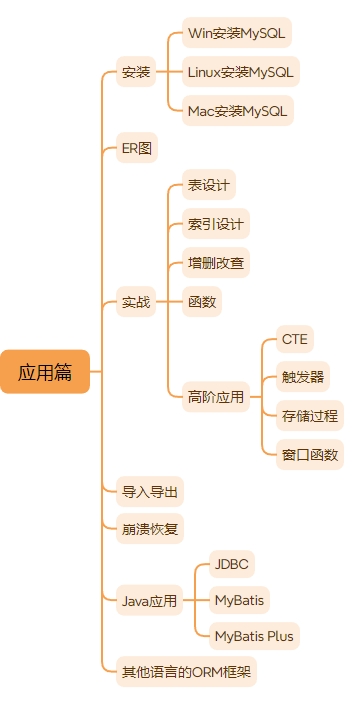
接下来是应用篇,应用篇的内容大致如下图所示。
教程概述 本教程将带你从零开始掌握MySQL在Java应用中的使用,涵盖从原生JDBC到现代化ORM框架的完整技术栈。通过丰富的实例和对比分析,帮助初级程序员快速上手数据库开发。
学习目标
掌握JDBC的基本使用和最佳实践
理解MyBatis的核心概念和配置
学会MyBatis Plus的高效开发模式
了解三种技术的适用场景和选择原则
技术栈对比
技术
学习难度
开发效率
灵活性
适用场景
JDBC
⭐⭐
⭐⭐
⭐⭐⭐⭐⭐
底层操作、性能要求极高
MyBatis
⭐⭐⭐⭐
⭐⭐⭐⭐
⭐⭐⭐⭐
复杂查询、定制化需求
MyBatis Plus
⭐⭐⭐
⭐⭐⭐⭐⭐
⭐⭐⭐
快速开发、标准CRUD
第一部分:JDBC - Java数据库连接的基石 🏗️ JDBC架构原理 JDBC(Java Database Connectivity)是Java访问数据库的标准API,它定义了一套标准接口,允许Java程序与各种数据库进行交互。
想要学习JAVA链接MySQL数据库,首先就需要明白JDBC,因为所有的JAVA应用都是通过JDBC进行链接MySQL的。
1
2
3
4
5
6
7
8
9
┌─────────────────┐ │ Java应用程序 │ ├─────────────────┤ │ JDBC API │ ├─────────────────┤ │ JDBC驱动 │ ├─────────────────┤ │ MySQL数据库 │ └─────────────────┘
核心组件说明: 下面的核心组件共同构成了完整的JDBC。
DriverManager : 管理数据库驱动程序Connection : 表示与数据库的连接Statement : 执行SQL语句的对象PreparedStatement : 预编译的SQL语句ResultSet : SQL查询的结果集
JDBC快速入门 1. 添加MySQL驱动依赖 首先要在pom文件中添加mysql依赖
1 2 3 4 5 6 <dependency > <groupId > mysql</groupId > <artifactId > mysql-connector-java</artifactId > <version > 8.0.33</version > </dependency >
2. 数据库连接配置 这里指定了使用的是JDBC链接,链接mySQL的地址,连接到哪个database中,使用的用户名和密码是什么。
1 2 3 4 5 6 7 public class DatabaseConfig { public static final String URL = "jdbc:mysql://localhost:3306/demo_db?useSSL=false&serverTimezone=UTC" ; public static final String USERNAME = "root" ; public static final String PASSWORD = "password" ; public static final String DRIVER = "com.mysql.cj.jdbc.Driver" ; }
3. 创建示例数据表 1 2 3 4 5 6 7 8 9 10 11 12 13 14 CREATE TABLE users ( id INT PRIMARY KEY AUTO_INCREMENT, username VARCHAR (50 ) NOT NULL UNIQUE , email VARCHAR (100 ) NOT NULL , age INT , created_at TIMESTAMP DEFAULT CURRENT_TIMESTAMP ); INSERT INTO users (username, email, age) VALUES ('张三' , 'zhangsan@example.com' , 25 ), ('李四' , 'lisi@example.com' , 30 ), ('王五' , 'wangwu@example.com' , 28 );
JDBC核心操作示例 1. 基础连接和查询 1 2 3 4 5 6 7 8 9 10 11 12 13 14 15 16 17 18 19 20 21 22 23 24 25 26 27 28 29 30 31 32 33 34 35 36 37 38 39 40 41 42 43 44 45 import java.sql.*;public class JDBCBasicExample { public static void main (String[] args) { try { Class.forName(DatabaseConfig.DRIVER); } catch (ClassNotFoundException e) { System.out.println("驱动加载失败: " + e.getMessage()); return ; } try (Connection conn = DriverManager.getConnection( DatabaseConfig.URL, DatabaseConfig.USERNAME, DatabaseConfig.PASSWORD)) { System.out.println("数据库连接成功!" ); String sql = "SELECT * FROM users" ; Statement stmt = conn.createStatement(); ResultSet rs = stmt.executeQuery(sql); System.out.println("用户列表:" ); while (rs.next()) { int id = rs.getInt("id" ); String username = rs.getString("username" ); String email = rs.getString("email" ); int age = rs.getInt("age" ); Timestamp createdAt = rs.getTimestamp("created_at" ); System.out.printf("ID: %d, 用户名: %s, 邮箱: %s, 年龄: %d, 创建时间: %s%n" , id, username, email, age, createdAt); } } catch (SQLException e) { System.out.println("数据库操作异常: " + e.getMessage()); } } }
2. 用户实体类 1 2 3 4 5 6 7 8 9 10 11 12 13 14 15 16 17 18 19 20 21 22 23 24 25 26 27 28 29 30 31 32 33 34 35 36 37 38 39 40 41 import java.sql.Timestamp;public class User { private int id; private String username; private String email; private int age; private Timestamp createdAt; public User () {} public User (String username, String email, int age) { this .username = username; this .email = email; this .age = age; } public int getId () { return id; } public void setId (int id) { this .id = id; } public String getUsername () { return username; } public void setUsername (String username) { this .username = username; } public String getEmail () { return email; } public void setEmail (String email) { this .email = email; } public int getAge () { return age; } public void setAge (int age) { this .age = age; } public Timestamp getCreatedAt () { return createdAt; } public void setCreatedAt (Timestamp createdAt) { this .createdAt = createdAt; } @Override public String toString () { return String.format("User{id=%d, username='%s', email='%s', age=%d, createdAt=%s}" , id, username, email, age, createdAt); } }
3. 完整的CRUD操作 1 2 3 4 5 6 7 8 9 10 11 12 13 14 15 16 17 18 19 20 21 22 23 24 25 26 27 28 29 30 31 32 33 34 35 36 37 38 39 40 41 42 43 44 45 46 47 48 49 50 51 52 53 54 55 56 57 58 59 60 61 62 63 64 65 66 67 68 69 70 71 72 73 74 75 76 77 78 79 80 81 82 83 84 85 86 87 88 89 90 91 92 93 94 95 96 97 98 99 100 101 102 103 104 105 106 107 108 109 110 111 112 113 114 115 116 117 118 119 120 121 122 123 124 125 126 127 128 129 130 131 132 133 134 135 136 137 138 139 140 141 142 143 144 import java.sql.*;import java.util.ArrayList;import java.util.List;public class UserDAO { public boolean createUser (User user) { String sql = "INSERT INTO users (username, email, age) VALUES (?, ?, ?)" ; try (Connection conn = getConnection(); PreparedStatement pstmt = conn.prepareStatement(sql, Statement.RETURN_GENERATED_KEYS)) { pstmt.setString(1 , user.getUsername()); pstmt.setString(2 , user.getEmail()); pstmt.setInt(3 , user.getAge()); int affectedRows = pstmt.executeUpdate(); if (affectedRows > 0 ) { ResultSet generatedKeys = pstmt.getGeneratedKeys(); if (generatedKeys.next()) { user.setId(generatedKeys.getInt(1 )); } return true ; } } catch (SQLException e) { System.out.println("创建用户失败: " + e.getMessage()); } return false ; } public User getUserById (int id) { String sql = "SELECT * FROM users WHERE id = ?" ; try (Connection conn = getConnection(); PreparedStatement pstmt = conn.prepareStatement(sql)) { pstmt.setInt(1 , id); ResultSet rs = pstmt.executeQuery(); if (rs.next()) { return mapResultSetToUser(rs); } } catch (SQLException e) { System.out.println("查询用户失败: " + e.getMessage()); } return null ; } public List<User> getAllUsers () { List<User> users = new ArrayList <>(); String sql = "SELECT * FROM users ORDER BY created_at DESC" ; try (Connection conn = getConnection(); Statement stmt = conn.createStatement(); ResultSet rs = stmt.executeQuery(sql)) { while (rs.next()) { users.add(mapResultSetToUser(rs)); } } catch (SQLException e) { System.out.println("查询用户列表失败: " + e.getMessage()); } return users; } public boolean updateUser (User user) { String sql = "UPDATE users SET username = ?, email = ?, age = ? WHERE id = ?" ; try (Connection conn = getConnection(); PreparedStatement pstmt = conn.prepareStatement(sql)) { pstmt.setString(1 , user.getUsername()); pstmt.setString(2 , user.getEmail()); pstmt.setInt(3 , user.getAge()); pstmt.setInt(4 , user.getId()); return pstmt.executeUpdate() > 0 ; } catch (SQLException e) { System.out.println("更新用户失败: " + e.getMessage()); } return false ; } public boolean deleteUser (int id) { String sql = "DELETE FROM users WHERE id = ?" ; try (Connection conn = getConnection(); PreparedStatement pstmt = conn.prepareStatement(sql)) { pstmt.setInt(1 , id); return pstmt.executeUpdate() > 0 ; } catch (SQLException e) { System.out.println("删除用户失败: " + e.getMessage()); } return false ; } private Connection getConnection () throws SQLException { return DriverManager.getConnection( DatabaseConfig.URL, DatabaseConfig.USERNAME, DatabaseConfig.PASSWORD ); } private User mapResultSetToUser (ResultSet rs) throws SQLException { User user = new User (); user.setId(rs.getInt("id" )); user.setUsername(rs.getString("username" )); user.setEmail(rs.getString("email" )); user.setAge(rs.getInt("age" )); user.setCreatedAt(rs.getTimestamp("created_at" )); return user; } }
4. JDBC操作测试 1 2 3 4 5 6 7 8 9 10 11 12 13 14 15 16 17 18 19 20 21 22 23 24 25 26 27 28 29 30 31 32 33 34 35 36 37 38 39 40 41 42 43 public class JDBCTest { public static void main (String[] args) { UserDAO userDAO = new UserDAO (); System.out.println("=== 创建用户 ===" ); User newUser = new User ("赵六" , "zhaoliu@example.com" , 26 ); if (userDAO.createUser(newUser)) { System.out.println("用户创建成功,ID: " + newUser.getId()); } System.out.println("\n=== 查询用户 ===" ); User user = userDAO.getUserById(newUser.getId()); if (user != null ) { System.out.println("查询到用户: " + user); } System.out.println("\n=== 所有用户列表 ===" ); List<User> users = userDAO.getAllUsers(); users.forEach(System.out::println); System.out.println("\n=== 更新用户 ===" ); user.setAge(27 ); user.setEmail("zhaoliu_new@example.com" ); if (userDAO.updateUser(user)) { System.out.println("用户信息更新成功" ); System.out.println("更新后: " + userDAO.getUserById(user.getId())); } System.out.println("\n=== 删除用户 ===" ); if (userDAO.deleteUser(user.getId())) { System.out.println("用户删除成功" ); } System.out.println("删除后查询结果: " + userDAO.getUserById(user.getId())); } }
JDBC最佳实践 1. 连接池配置(使用HikariCP) 1 2 3 4 5 6 <dependency > <groupId > com.zaxxer</groupId > <artifactId > HikariCP</artifactId > <version > 5.0.1</version > </dependency >
1 2 3 4 5 6 7 8 9 10 11 12 13 14 15 16 17 18 19 20 21 22 23 24 25 26 27 28 29 30 31 32 33 34 35 import com.zaxxer.hikari.HikariConfig;import com.zaxxer.hikari.HikariDataSource;import javax.sql.DataSource;public class ConnectionPool { private static HikariDataSource dataSource; static { HikariConfig config = new HikariConfig (); config.setJdbcUrl(DatabaseConfig.URL); config.setUsername(DatabaseConfig.USERNAME); config.setPassword(DatabaseConfig.PASSWORD); config.setDriverClassName(DatabaseConfig.DRIVER); config.setMaximumPoolSize(20 ); config.setMinimumIdle(5 ); config.setConnectionTimeout(30000 ); config.setIdleTimeout(600000 ); config.setMaxLifetime(1800000 ); dataSource = new HikariDataSource (config); } public static DataSource getDataSource () { return dataSource; } public static void close () { if (dataSource != null ) { dataSource.close(); } } }
2. 事务管理示例 1 2 3 4 5 6 7 8 9 10 11 12 13 14 15 16 17 18 19 20 21 22 23 24 25 26 27 28 29 30 31 32 33 34 35 36 37 38 39 40 41 42 43 44 45 46 47 48 49 50 51 52 53 54 55 56 57 58 59 60 61 import java.sql.Connection;import java.sql.SQLException;public class TransactionExample { public boolean transferMoney (int fromUserId, int toUserId, double amount) { Connection conn = null ; try { conn = ConnectionPool.getDataSource().getConnection(); conn.setAutoCommit(false ); if (!checkBalance(conn, fromUserId, amount)) { throw new SQLException ("余额不足" ); } updateBalance(conn, fromUserId, -amount); updateBalance(conn, toUserId, amount); conn.commit(); System.out.println("转账成功" ); return true ; } catch (SQLException e) { try { if (conn != null ) { conn.rollback(); System.out.println("转账失败,已回滚: " + e.getMessage()); } } catch (SQLException ex) { System.out.println("回滚失败: " + ex.getMessage()); } return false ; } finally { try { if (conn != null ) { conn.setAutoCommit(true ); conn.close(); } } catch (SQLException e) { System.out.println("关闭连接失败: " + e.getMessage()); } } } private boolean checkBalance (Connection conn, int userId, double amount) throws SQLException { return true ; } private void updateBalance (Connection conn, int userId, double amount) throws SQLException { } }
JDBC优缺点分析 接下来看一下使用JDBC的优缺点,因此,我们才会明白为什么会有MyBatis出现。
✅ 优点
性能最优 : 直接操作数据库,无额外抽象层开销完全控制 : 可以精确控制SQL语句和执行过程标准API : Java标准库支持,无需额外依赖灵活性高 : 支持复杂查询和存储过程调用轻量级 : 占用内存少,启动快
❌ 缺点
代码繁琐 : 需要手写大量样板代码容易出错 : 手动处理连接、异常和资源释放维护困难 : SQL散落在Java代码中,难以统一管理开发效率低 : 简单CRUD操作也需要大量代码类型安全性差 : 编译时无法检查SQL语法错误
JDBC适用场景
性能要求极高 的应用(如高频交易系统)复杂的数据库操作 (存储过程、函数调用)底层框架开发 (ORM框架的底层实现)数据库迁移工具 开发小型应用 或学习阶段 的项目
第二部分:MyBatis - 优雅的持久层框架 yBatis架构原理 通过上面的学习,看一看到想使用JDBC来写项目,需要写大量的代码,而且这些代码和业务是没有关联的。
为了让开发更专注业务,而不是这些重复的工作,因此,可以使用MyBatis
MyBatis是一个优秀的持久层框架,它支持定制化SQL、存储过程以及高级映射。MyBatis避免了几乎所有的JDBC代码和手动设置参数以及获取结果集。
1 2 3 4 5 6 7 8 9 10 11 12 13 14 15 16 17 ┌─────────────────────┐ │ Java应用程序 │ ├─────────────────────┤ │ MyBatis API │ ├─────────────────────┤ │ SQL映射文件 │ │ (Mapper.xml) │ ├─────────────────────┤ │ MyBatis核心 │ │ ├─ SqlSession │ │ ├─ SqlSessionFactory│ │ └─ Configuration │ ├─────────────────────┤ │ JDBC Driver │ ├─────────────────────┤ │ MySQL数据库 │ └─────────────────────┘
核心组件说明: 下面的核心组件共同构成了MyBatis框架。帮助我们简单快速的使用JDBC连接数据库。
SqlSessionFactory : 会话工厂,用于创建SqlSessionSqlSession : 会话对象,包含执行SQL的所有方法Mapper : 映射器,定义数据访问接口Configuration : 配置对象,包含MyBatis的所有配置信息
MyBatis快速入门 1. 添加MyBatis依赖 1 2 3 4 5 6 7 8 9 10 11 12 13 14 15 16 17 18 19 20 21 22 23 <dependencies > <dependency > <groupId > org.mybatis</groupId > <artifactId > mybatis</artifactId > <version > 3.5.13</version > </dependency > <dependency > <groupId > mysql</groupId > <artifactId > mysql-connector-java</artifactId > <version > 8.0.33</version > </dependency > <dependency > <groupId > org.slf4j</groupId > <artifactId > slf4j-simple</artifactId > <version > 1.7.36</version > </dependency > </dependencies >
2. MyBatis核心配置文件 1 2 3 4 5 6 7 8 9 10 11 12 13 14 15 16 17 18 19 20 21 22 23 24 25 26 27 28 29 30 31 32 33 34 35 36 37 38 39 40 41 42 43 44 45 46 47 48 <?xml version="1.0" encoding="UTF-8" ?> <!DOCTYPE configuration PUBLIC "-//mybatis.org//DTD Config 3.0//EN" "http://mybatis.org/dtd/mybatis-3-config.dtd" > <configuration > <settings > <setting name ="mapUnderscoreToCamelCase" value ="true" /> <setting name ="lazyLoadingEnabled" value ="true" /> <setting name ="defaultStatementTimeout" value ="30" /> <setting name ="cacheEnabled" value ="true" /> </settings > <typeAliases > <typeAlias type ="com.example.model.User" alias ="User" /> <typeAlias type ="com.example.model.Order" alias ="Order" /> </typeAliases > <environments default ="development" > <environment id ="development" > <transactionManager type ="JDBC" /> <dataSource type ="POOLED" > <property name ="driver" value ="com.mysql.cj.jdbc.Driver" /> <property name ="url" value ="jdbc:mysql://localhost:3306/demo_db?useSSL=false& serverTimezone=UTC" /> <property name ="username" value ="root" /> <property name ="password" value ="password" /> <property name ="poolMaximumActiveConnections" value ="20" /> <property name ="poolMaximumIdleConnections" value ="5" /> <property name ="poolMaximumCheckoutTime" value ="20000" /> <property name ="poolTimeToWait" value ="20000" /> </dataSource > </environment > </environments > <mappers > <mapper resource ="mappers/UserMapper.xml" /> <mapper resource ="mappers/OrderMapper.xml" /> </mappers > </configuration >
3. 创建扩展的实体类 1 2 3 4 5 6 7 8 9 10 11 12 13 14 15 16 17 18 19 20 21 22 23 24 25 26 27 28 29 30 31 32 33 34 35 36 37 38 39 40 41 42 43 44 45 46 import java.sql.Timestamp;import java.util.List;public class User { private Integer id; private String username; private String email; private Integer age; private Timestamp createdAt; private List<Order> orders; public User () {} public User (String username, String email, Integer age) { this .username = username; this .email = email; this .age = age; } public Integer getId () { return id; } public void setId (Integer id) { this .id = id; } public String getUsername () { return username; } public void setUsername (String username) { this .username = username; } public String getEmail () { return email; } public void setEmail (String email) { this .email = email; } public Integer getAge () { return age; } public void setAge (Integer age) { this .age = age; } public Timestamp getCreatedAt () { return createdAt; } public void setCreatedAt (Timestamp createdAt) { this .createdAt = createdAt; } public List<Order> getOrders () { return orders; } public void setOrders (List<Order> orders) { this .orders = orders; } @Override public String toString () { return String.format("User{id=%d, username='%s', email='%s', age=%d, createdAt=%s, orders=%d}" , id, username, email, age, createdAt, orders != null ? orders.size() : 0 ); } }
1 2 3 4 5 6 7 8 9 10 11 12 13 14 15 16 17 18 19 20 21 22 23 24 25 26 27 28 29 30 31 32 33 34 35 36 37 38 39 40 41 42 43 44 45 46 47 48 49 50 51 import java.math.BigDecimal;import java.sql.Timestamp;public class Order { private Integer id; private Integer userId; private String orderNo; private BigDecimal amount; private String status; private Timestamp createdAt; private User user; public Order () {} public Order (Integer userId, String orderNo, BigDecimal amount, String status) { this .userId = userId; this .orderNo = orderNo; this .amount = amount; this .status = status; } public Integer getId () { return id; } public void setId (Integer id) { this .id = id; } public Integer getUserId () { return userId; } public void setUserId (Integer userId) { this .userId = userId; } public String getOrderNo () { return orderNo; } public void setOrderNo (String orderNo) { this .orderNo = orderNo; } public BigDecimal getAmount () { return amount; } public void setAmount (BigDecimal amount) { this .amount = amount; } public String getStatus () { return status; } public void setStatus (String status) { this .status = status; } public Timestamp getCreatedAt () { return createdAt; } public void setCreatedAt (Timestamp createdAt) { this .createdAt = createdAt; } public User getUser () { return user; } public void setUser (User user) { this .user = user; } @Override public String toString () { return String.format("Order{id=%d, userId=%d, orderNo='%s', amount=%s, status='%s', createdAt=%s}" , id, userId, orderNo, amount, status, createdAt); } }
4. 数据表扩展 1 2 3 4 5 6 7 8 9 10 11 12 13 14 15 16 17 CREATE TABLE orders ( id INT PRIMARY KEY AUTO_INCREMENT, user_id INT NOT NULL , order_no VARCHAR (50 ) UNIQUE NOT NULL , amount DECIMAL (10 ,2 ) NOT NULL , status VARCHAR (20 ) DEFAULT 'PENDING' , created_at TIMESTAMP DEFAULT CURRENT_TIMESTAMP , FOREIGN KEY (user_id) REFERENCES users(id) ON DELETE CASCADE ); INSERT INTO orders (user_id, order_no, amount, status) VALUES (1 , 'ORD001' , 299.99 , 'COMPLETED' ), (1 , 'ORD002' , 159.50 , 'PENDING' ), (2 , 'ORD003' , 89.99 , 'COMPLETED' ), (3 , 'ORD004' , 199.99 , 'CANCELLED' );
MyBatis核心操作示例 1. Mapper接口定义 1 2 3 4 5 6 7 8 9 10 11 12 13 14 15 16 17 18 19 20 21 22 23 24 25 26 27 28 29 30 31 32 33 import java.util.List;import java.util.Map;import org.apache.ibatis.annotations.*;public interface UserMapper { int insertUser (User user) ; User selectUserById (Integer id) ; List<User> selectAllUsers () ; int updateUser (User user) ; int deleteUser (Integer id) ; List<User> selectUsersByAge (@Param("minAge") Integer minAge, @Param("maxAge") Integer maxAge) ; List<User> selectUsersByCondition (Map<String, Object> params) ; User selectUserWithOrders (Integer id) ; List<User> selectUsersWithOrders () ; List<User> selectUsersByPage (@Param("offset") Integer offset, @Param("limit") Integer limit) ; int countUsers () ; int countUsersByStatus (String status) ; int batchInsertUsers (@Param("users") List<User> users) ; int batchUpdateUsers (@Param("users") List<User> users) ; }
2. MyBatis XML映射文件 可以直接在XML文件中实现我们需要写的SQL语句就可以了,不需要在进行连接等等一大堆代码。
1 2 3 4 5 6 7 8 9 10 11 12 13 14 15 16 17 18 19 20 21 22 23 24 25 26 27 28 29 30 31 32 33 34 35 36 37 38 39 40 41 42 43 44 45 46 47 48 49 50 51 52 53 54 55 56 57 58 59 60 61 62 63 64 65 66 67 68 69 70 71 72 73 74 75 76 77 78 79 80 81 82 83 84 85 86 87 88 89 90 91 92 93 94 95 96 97 98 99 100 101 102 103 104 105 106 107 108 109 110 111 112 113 114 115 116 117 118 119 120 121 122 123 124 125 126 127 128 129 130 131 132 133 134 135 136 137 138 139 140 141 142 143 144 145 146 147 148 149 150 151 152 153 <?xml version="1.0" encoding="UTF-8" ?> <!DOCTYPE mapper PUBLIC "-//mybatis.org//DTD Mapper 3.0//EN" "http://mybatis.org/dtd/mybatis-3-mapper.dtd" > <mapper namespace ="com.example.mapper.UserMapper" > <resultMap id ="BaseResultMap" type ="User" > <id column ="id" property ="id" /> <result column ="username" property ="username" /> <result column ="email" property ="email" /> <result column ="age" property ="age" /> <result column ="created_at" property ="createdAt" /> </resultMap > <resultMap id ="UserWithOrdersMap" type ="User" extends ="BaseResultMap" > <collection property ="orders" ofType ="Order" > <id column ="order_id" property ="id" /> <result column ="order_no" property ="orderNo" /> <result column ="amount" property ="amount" /> <result column ="status" property ="status" /> <result column ="order_created_at" property ="createdAt" /> </collection > </resultMap > <sql id ="Base_Column_List" > id, username, email, age, created_at </sql > <insert id ="insertUser" parameterType ="User" useGeneratedKeys ="true" keyProperty ="id" > INSERT INTO users (username, email, age) VALUES (#{username}, #{email}, #{age}) </insert > <select id ="selectUserById" parameterType ="Integer" resultMap ="BaseResultMap" > SELECT <include refid ="Base_Column_List" /> FROM users WHERE id = #{id} </select > <select id ="selectAllUsers" resultMap ="BaseResultMap" > SELECT <include refid ="Base_Column_List" /> FROM users ORDER BY created_at DESC </select > <update id ="updateUser" parameterType ="User" > UPDATE users SET username = #{username}, email = #{email}, age = #{age} WHERE id = #{id} </update > <delete id ="deleteUser" parameterType ="Integer" > DELETE FROM users WHERE id = #{id} </delete > <select id ="selectUsersByAge" resultMap ="BaseResultMap" > SELECT <include refid ="Base_Column_List" /> FROM users WHERE age BETWEEN #{minAge} AND #{maxAge} ORDER BY age </select > <select id ="selectUsersByCondition" parameterType ="Map" resultMap ="BaseResultMap" > SELECT <include refid ="Base_Column_List" /> FROM users <where > <if test ="username != null and username != ''" > AND username LIKE CONCAT('%', #{username}, '%') </if > <if test ="email != null and email != ''" > AND email LIKE CONCAT('%', #{email}, '%') </if > <if test ="minAge != null" > AND age >= #{minAge} </if > <if test ="maxAge != null" > AND age <= #{maxAge} </if > </where > ORDER BY created_at DESC </select > <select id ="selectUserWithOrders" parameterType ="Integer" resultMap ="UserWithOrdersMap" > SELECT u.id, u.username, u.email, u.age, u.created_at, o.id as order_id, o.order_no, o.amount, o.status, o.created_at as order_created_at FROM users u LEFT JOIN orders o ON u.id = o.user_id WHERE u.id = #{id} ORDER BY o.created_at DESC </select > <select id ="selectUsersWithOrders" resultMap ="UserWithOrdersMap" > SELECT u.id, u.username, u.email, u.age, u.created_at, o.id as order_id, o.order_no, o.amount, o.status, o.created_at as order_created_at FROM users u LEFT JOIN orders o ON u.id = o.user_id ORDER BY u.id, o.created_at DESC </select > <select id ="selectUsersByPage" resultMap ="BaseResultMap" > SELECT <include refid ="Base_Column_List" /> FROM users ORDER BY created_at DESC LIMIT #{offset}, #{limit} </select > <select id ="countUsers" resultType ="Integer" > SELECT COUNT(*) FROM users </select > <insert id ="batchInsertUsers" parameterType ="List" useGeneratedKeys ="true" keyProperty ="id" > INSERT INTO users (username, email, age) VALUES <foreach collection ="users" item ="user" separator ="," > (#{user.username}, #{user.email}, #{user.age}) </foreach > </insert > <update id ="batchUpdateUsers" parameterType ="List" > <foreach collection ="users" item ="user" separator =";" > UPDATE users SET username = #{user.username}, email = #{user.email}, age = #{user.age} WHERE id = #{user.id} </foreach > </update > </mapper >
3. MyBatis工具类 1 2 3 4 5 6 7 8 9 10 11 12 13 14 15 16 17 18 19 20 21 22 23 24 25 26 27 28 29 30 31 32 33 34 35 36 37 38 39 40 41 42 43 44 45 46 47 48 49 50 51 52 53 import org.apache.ibatis.io.Resources;import org.apache.ibatis.session.SqlSession;import org.apache.ibatis.session.SqlSessionFactory;import org.apache.ibatis.session.SqlSessionFactoryBuilder;import java.io.IOException;import java.io.InputStream;public class MyBatisUtil { private static SqlSessionFactory sqlSessionFactory; static { try { String resource = "mybatis-config.xml" ; InputStream inputStream = Resources.getResourceAsStream(resource); sqlSessionFactory = new SqlSessionFactoryBuilder ().build(inputStream); } catch (IOException e) { throw new RuntimeException ("初始化MyBatis失败" , e); } } public static SqlSession getSqlSession () { return sqlSessionFactory.openSession(); } public static SqlSession getSqlSession (boolean autoCommit) { return sqlSessionFactory.openSession(autoCommit); } public static <T> T getMapper (Class<T> mapperClass) { SqlSession session = getSqlSession(); return session.getMapper(mapperClass); } public static void closeSqlSession (SqlSession session) { if (session != null ) { session.close(); } } }
4. MyBatis服务层实现 1 2 3 4 5 6 7 8 9 10 11 12 13 14 15 16 17 18 19 20 21 22 23 24 25 26 27 28 29 30 31 32 33 34 35 36 37 38 39 40 41 42 43 44 45 46 47 48 49 50 51 52 53 54 55 56 57 58 59 60 61 62 63 64 65 66 67 68 69 70 71 72 73 74 75 76 77 78 79 80 81 82 83 84 85 86 87 88 89 90 91 92 93 94 95 96 97 98 99 100 101 102 103 104 105 106 107 108 109 110 111 112 113 114 115 116 117 118 119 120 121 122 123 124 125 126 127 128 129 130 131 132 133 134 135 136 137 138 139 140 141 142 143 144 145 146 147 148 149 150 151 152 153 154 155 156 157 158 159 160 161 162 163 164 165 166 167 168 169 170 import org.apache.ibatis.session.SqlSession;import java.util.HashMap;import java.util.List;import java.util.Map;public class UserService { public boolean createUser (User user) { SqlSession session = MyBatisUtil.getSqlSession(); try { UserMapper mapper = session.getMapper(UserMapper.class); int result = mapper.insertUser(user); session.commit(); return result > 0 ; } catch (Exception e) { session.rollback(); System.out.println("创建用户失败: " + e.getMessage()); return false ; } finally { MyBatisUtil.closeSqlSession(session); } } public User getUserById (Integer id) { try (SqlSession session = MyBatisUtil.getSqlSession()) { UserMapper mapper = session.getMapper(UserMapper.class); return mapper.selectUserById(id); } catch (Exception e) { System.out.println("查询用户失败: " + e.getMessage()); return null ; } } public List<User> getAllUsers () { try (SqlSession session = MyBatisUtil.getSqlSession()) { UserMapper mapper = session.getMapper(UserMapper.class); return mapper.selectAllUsers(); } catch (Exception e) { System.out.println("查询用户列表失败: " + e.getMessage()); return null ; } } public boolean updateUser (User user) { SqlSession session = MyBatisUtil.getSqlSession(); try { UserMapper mapper = session.getMapper(UserMapper.class); int result = mapper.updateUser(user); session.commit(); return result > 0 ; } catch (Exception e) { session.rollback(); System.out.println("更新用户失败: " + e.getMessage()); return false ; } finally { MyBatisUtil.closeSqlSession(session); } } public boolean deleteUser (Integer id) { SqlSession session = MyBatisUtil.getSqlSession(); try { UserMapper mapper = session.getMapper(UserMapper.class); int result = mapper.deleteUser(id); session.commit(); return result > 0 ; } catch (Exception e) { session.rollback(); System.out.println("删除用户失败: " + e.getMessage()); return false ; } finally { MyBatisUtil.closeSqlSession(session); } } public List<User> getUsersByAgeRange (Integer minAge, Integer maxAge) { try (SqlSession session = MyBatisUtil.getSqlSession()) { UserMapper mapper = session.getMapper(UserMapper.class); return mapper.selectUsersByAge(minAge, maxAge); } catch (Exception e) { System.out.println("按年龄查询用户失败: " + e.getMessage()); return null ; } } public List<User> getUsersByCondition (String username, String email, Integer minAge, Integer maxAge) { try (SqlSession session = MyBatisUtil.getSqlSession()) { UserMapper mapper = session.getMapper(UserMapper.class); Map<String, Object> params = new HashMap <>(); params.put("username" , username); params.put("email" , email); params.put("minAge" , minAge); params.put("maxAge" , maxAge); return mapper.selectUsersByCondition(params); } catch (Exception e) { System.out.println("条件查询用户失败: " + e.getMessage()); return null ; } } public User getUserWithOrders (Integer id) { try (SqlSession session = MyBatisUtil.getSqlSession()) { UserMapper mapper = session.getMapper(UserMapper.class); return mapper.selectUserWithOrders(id); } catch (Exception e) { System.out.println("查询用户订单失败: " + e.getMessage()); return null ; } } public List<User> getUsersByPage (int page, int size) { try (SqlSession session = MyBatisUtil.getSqlSession()) { UserMapper mapper = session.getMapper(UserMapper.class); int offset = (page - 1 ) * size; return mapper.selectUsersByPage(offset, size); } catch (Exception e) { System.out.println("分页查询用户失败: " + e.getMessage()); return null ; } } public boolean batchCreateUsers (List<User> users) { SqlSession session = MyBatisUtil.getSqlSession(); try { UserMapper mapper = session.getMapper(UserMapper.class); int result = mapper.batchInsertUsers(users); session.commit(); return result > 0 ; } catch (Exception e) { session.rollback(); System.out.println("批量创建用户失败: " + e.getMessage()); return false ; } finally { MyBatisUtil.closeSqlSession(session); } } }
5. MyBatis测试示例 1 2 3 4 5 6 7 8 9 10 11 12 13 14 15 16 17 18 19 20 21 22 23 24 25 26 27 28 29 30 31 32 33 34 35 36 37 38 39 40 41 42 43 44 45 46 47 48 49 50 51 52 53 54 55 56 57 58 59 60 61 62 63 64 65 66 67 68 69 70 71 72 73 74 75 76 77 78 79 80 81 82 83 84 85 86 87 88 89 90 91 import java.math.BigDecimal;import java.util.Arrays;import java.util.List;public class MyBatisTest { public static void main (String[] args) { UserService userService = new UserService (); System.out.println("=== 创建用户测试 ===" ); User newUser = new User ("陈七" , "chenqi@example.com" , 24 ); if (userService.createUser(newUser)) { System.out.println("用户创建成功,ID: " + newUser.getId()); } System.out.println("\n=== 查询用户测试 ===" ); User user = userService.getUserById(newUser.getId()); if (user != null ) { System.out.println("查询到用户: " + user); } System.out.println("\n=== 所有用户列表 ===" ); List<User> users = userService.getAllUsers(); if (users != null ) { users.forEach(System.out::println); } System.out.println("\n=== 年龄范围查询 (25-30岁) ===" ); List<User> usersByAge = userService.getUsersByAgeRange(25 , 30 ); if (usersByAge != null ) { usersByAge.forEach(System.out::println); } System.out.println("\n=== 动态条件查询 ===" ); List<User> usersByCondition = userService.getUsersByCondition("张" , null , 20 , 35 ); if (usersByCondition != null ) { usersByCondition.forEach(System.out::println); } System.out.println("\n=== 查询用户及订单 ===" ); User userWithOrders = userService.getUserWithOrders(1 ); if (userWithOrders != null ) { System.out.println("用户信息: " + userWithOrders); if (userWithOrders.getOrders() != null ) { System.out.println("订单列表:" ); userWithOrders.getOrders().forEach(order -> System.out.println(" " + order)); } } System.out.println("\n=== 分页查询 (第1页,每页2条) ===" ); List<User> pageUsers = userService.getUsersByPage(1 , 2 ); if (pageUsers != null ) { pageUsers.forEach(System.out::println); } System.out.println("\n=== 批量创建用户 ===" ); List<User> batchUsers = Arrays.asList( new User ("批量用户1" , "batch1@example.com" , 22 ), new User ("批量用户2" , "batch2@example.com" , 23 ), new User ("批量用户3" , "batch3@example.com" , 24 ) ); if (userService.batchCreateUsers(batchUsers)) { System.out.println("批量创建用户成功" ); batchUsers.forEach(u -> System.out.println("新用户ID: " + u.getId())); } System.out.println("\n=== 更新用户 ===" ); user.setAge(25 ); user.setEmail("chenqi_updated@example.com" ); if (userService.updateUser(user)) { System.out.println("用户更新成功" ); System.out.println("更新后: " + userService.getUserById(user.getId())); } System.out.println("\n=== 删除用户 ===" ); if (userService.deleteUser(user.getId())) { System.out.println("用户删除成功" ); } } }
MyBatis高级特性 1. 注解方式映射 通过@Select和@Insert等注解可以直接实现SQL语句,而不需要在XML文件中写SQL。
1 2 3 4 5 6 7 8 9 10 11 12 13 14 15 16 17 18 19 20 21 22 23 24 25 26 27 28 29 30 import org.apache.ibatis.annotations.*;import java.util.List;public interface UserAnnotationMapper { @Select("SELECT * FROM users WHERE id = #{id}") @Results({ @Result(property = "id", column = "id"), @Result(property = "username", column = "username"), @Result(property = "email", column = "email"), @Result(property = "age", column = "age"), @Result(property = "createdAt", column = "created_at") }) User selectUserById (Integer id) ; @Insert("INSERT INTO users(username, email, age) VALUES(#{username}, #{email}, #{age})") @Options(useGeneratedKeys = true, keyProperty = "id") int insertUser (User user) ; @Update("UPDATE users SET username=#{username}, email=#{email}, age=#{age} WHERE id=#{id}") int updateUser (User user) ; @Delete("DELETE FROM users WHERE id = #{id}") int deleteUser (Integer id) ; @SelectProvider(type = UserSqlProvider.class, method = "selectUsersByCondition") List<User> selectUsersByCondition (Map<String, Object> params) ; }
2. 动态SQL提供者 1 2 3 4 5 6 7 8 9 10 11 12 13 14 15 16 17 18 19 20 21 22 23 24 25 26 27 28 import org.apache.ibatis.jdbc.SQL;import java.util.Map;public class UserSqlProvider { public String selectUsersByCondition (Map<String, Object> params) { return new SQL () {{ SELECT("*" ); FROM("users" ); if (params.get("username" ) != null ) { WHERE("username LIKE CONCAT('%', #{username}, '%')" ); } if (params.get("email" ) != null ) { WHERE("email LIKE CONCAT('%', #{email}, '%')" ); } if (params.get("minAge" ) != null ) { WHERE("age >= #{minAge}" ); } if (params.get("maxAge" ) != null ) { WHERE("age <= #{maxAge}" ); } ORDER_BY("created_at DESC" ); }}.toString(); } }
3. 二级缓存配置 1 2 3 4 5 6 7 8 9 10 11 <cache eviction ="LRU" flushInterval ="60000" size ="512" readOnly ="true" /> <cache type ="org.apache.ibatis.cache.impl.PerpetualCache" > <property name ="cacheFile" value ="/tmp/user-cache.tmp" /> </cache >
4. 插件开发示例 1 2 3 4 5 6 7 8 9 10 11 12 13 14 15 16 17 18 19 20 21 22 23 24 25 26 27 28 29 30 31 32 33 34 35 36 37 38 39 40 import org.apache.ibatis.executor.Executor;import org.apache.ibatis.mapping.MappedStatement;import org.apache.ibatis.plugin.*;import org.apache.ibatis.session.ResultHandler;import org.apache.ibatis.session.RowBounds;@Intercepts({ @Signature(type = Executor.class, method = "query", args = {MappedStatement.class, Object.class, RowBounds.class, ResultHandler.class}) }) public class PerformanceInterceptor implements Interceptor { @Override public Object intercept (Invocation invocation) throws Throwable { long startTime = System.currentTimeMillis(); Object result = invocation.proceed(); long endTime = System.currentTimeMillis(); long executionTime = endTime - startTime; MappedStatement mappedStatement = (MappedStatement) invocation.getArgs()[0 ]; String sqlId = mappedStatement.getId(); System.out.printf("SQL执行耗时: %s - %d ms%n" , sqlId, executionTime); return result; } @Override public Object plugin (Object target) { return Plugin.wrap(target, this ); } @Override public void setProperties (Properties properties) { } }
MyBatis优缺点分析 ✅ 优点
灵活的SQL控制 : 完全控制SQL语句,支持复杂查询学习成本适中 : 相比JPA等框架更容易上手性能优秀 : 接近原生JDBC的性能强大的映射功能 : 支持复杂的对象关系映射动态SQL : 根据条件动态生成SQL插件机制 : 支持拦截器和插件扩展缓存机制 : 内置一级、二级缓存
❌ 缺点
配置复杂 : 需要编写大量XML配置文件SQL与Java代码分离 : 维护时需要在多个文件间切换数据库依赖 : 不同数据库的SQL可能需要调整调试困难 : XML中的SQL错误不易发现代码生成依赖 : 复杂项目需要代码生成工具
MyBatis适用场景
复杂查询需求 的应用(报表系统、数据分析)对SQL性能要求高 的项目需要精确控制SQL 的业务场景团队SQL能力较强 的开发团队数据库表结构复杂 的遗留系统集成需要与存储过程交互 的企业应用
第三部分:MyBatis Plus - 极速开发利器 MyBatis Plus架构原理 MyBatis Plus(简称MP)是一个MyBatis的增强工具,在MyBatis的基础上只做增强不做改变,为简化开发、提高效率而生。它提供了强大的CRUD操作、条件构造器、代码生成器等功能。
1 2 3 4 5 6 7 8 9 10 11 12 13 14 15 16 17 18 ┌─────────────────────────┐ │ Spring Boot应用 │ ├─────────────────────────┤ │ MyBatis Plus │ │ ├─ BaseMapper │ │ ├─ IService │ │ ├─ QueryWrapper │ │ └─ CodeGenerator │ ├─────────────────────────┤ │ MyBatis核心 │ │ ├─ SqlSession │ │ ├─ SqlSessionFactory │ │ └─ Configuration │ ├─────────────────────────┤ │ JDBC Driver │ ├─────────────────────────┤ │ MySQL数据库 │ └─────────────────────────┘
核心组件说明:
BaseMapper : 通用Mapper接口,提供基础CRUD方法IService : 通用Service接口,提供更多便捷方法QueryWrapper : 条件构造器,用于动态SQL构建CodeGenerator : 代码生成器,自动生成实体、Mapper等分页插件 : 物理分页支持乐观锁插件 : 防止并发修改
MyBatis Plus快速入门 1. 添加依赖(Spring Boot项目) 1 2 3 4 5 6 7 8 9 10 11 12 13 14 15 16 17 18 19 20 21 22 23 24 25 26 27 28 29 30 31 32 33 34 35 36 37 38 39 40 41 42 43 44 45 <dependencies > <dependency > <groupId > org.springframework.boot</groupId > <artifactId > spring-boot-starter</artifactId > <version > 2.7.14</version > </dependency > <dependency > <groupId > com.baomidou</groupId > <artifactId > mybatis-plus-boot-starter</artifactId > <version > 3.5.3.2</version > </dependency > <dependency > <groupId > mysql</groupId > <artifactId > mysql-connector-java</artifactId > <version > 8.0.33</version > </dependency > <dependency > <groupId > com.baomidou</groupId > <artifactId > mybatis-plus-generator</artifactId > <version > 3.5.3.2</version > </dependency > <dependency > <groupId > org.apache.velocity</groupId > <artifactId > velocity-engine-core</artifactId > <version > 2.3</version > </dependency > <dependency > <groupId > org.projectlombok</groupId > <artifactId > lombok</artifactId > <version > 1.18.28</version > <scope > provided</scope > </dependency > </dependencies >
2. 配置文件 1 2 3 4 5 6 7 8 9 10 11 12 13 14 15 16 17 18 19 20 21 22 23 24 25 26 27 28 29 30 31 32 33 spring: datasource: driver-class-name: com.mysql.cj.jdbc.Driver url: jdbc:mysql://localhost:3306/demo_db?useSSL=false&serverTimezone=UTC&allowPublicKeyRetrieval=true username: root password: password mybatis-plus: configuration: map-underscore-to-camel-case: true log-impl: org.apache.ibatis.logging.stdout.StdOutImpl global-config: db-config: id-type: AUTO logic-delete-field: deleted logic-delete-value: 1 logic-not-delete-value: 0 mapper-locations: classpath*:/mapper/**/*.xml type-aliases-package: com.example.entity pagehelper: helper-dialect: mysql reasonable: true support-methods-arguments: true
3. 实体类设计(使用注解) 通过注解可以方便的将实体的字段映射为数据库的字段。
1 2 3 4 5 6 7 8 9 10 11 12 13 14 15 16 17 18 19 20 21 22 23 24 25 26 27 28 29 30 31 32 33 34 35 36 37 38 39 40 41 42 43 import com.baomidou.mybatisplus.annotation.*;import lombok.Data;import lombok.EqualsAndHashCode;import lombok.experimental.Accessors;import java.io.Serializable;import java.time.LocalDateTime;@Data @EqualsAndHashCode(callSuper = false) @Accessors(chain = true) @TableName("users") public class User implements Serializable { private static final long serialVersionUID = 1L ; @TableId(value = "id", type = IdType.AUTO) private Integer id; @TableField("username") private String username; @TableField("email") private String email; @TableField("age") private Integer age; @TableField(value = "created_at", fill = FieldFill.INSERT) private LocalDateTime createdAt; @TableField(value = "updated_at", fill = FieldFill.INSERT_UPDATE) private LocalDateTime updatedAt; @TableLogic @TableField("deleted") private Integer deleted; @TableField(exist = false) private String tempField; }
1 2 3 4 5 6 7 8 9 10 11 12 13 14 15 16 17 18 19 20 21 22 23 24 25 26 27 28 29 30 31 32 33 34 35 36 37 38 39 40 41 42 43 44 45 46 47 import com.baomidou.mybatisplus.annotation.*;import lombok.Data;import lombok.EqualsAndHashCode;import lombok.experimental.Accessors;import java.io.Serializable;import java.math.BigDecimal;import java.time.LocalDateTime;@Data @EqualsAndHashCode(callSuper = false) @Accessors(chain = true) @TableName("orders") public class Order implements Serializable { private static final long serialVersionUID = 1L ; @TableId(value = "id", type = IdType.AUTO) private Integer id; @TableField("user_id") private Integer userId; @TableField("order_no") private String orderNo; @TableField("amount") private BigDecimal amount; @TableField("status") private String status; @TableField(value = "created_at", fill = FieldFill.INSERT) private LocalDateTime createdAt; @TableField(value = "updated_at", fill = FieldFill.INSERT_UPDATE) private LocalDateTime updatedAt; @Version @TableField("version") private Integer version; @TableLogic @TableField("deleted") private Integer deleted; }
4. 自动填充处理器 对于一些数据库的时间字段,可以使用自动填充。自动设置,不需要每一次插入的时候都写重复代码了。
1 2 3 4 5 6 7 8 9 10 11 12 13 14 15 16 17 18 19 20 21 import com.baomidou.mybatisplus.core.handlers.MetaObjectHandler;import org.apache.ibatis.reflection.MetaObject;import org.springframework.stereotype.Component;import java.time.LocalDateTime;@Component public class MyMetaObjectHandler implements MetaObjectHandler { @Override public void insertFill (MetaObject metaObject) { this .strictInsertFill(metaObject, "createdAt" , LocalDateTime.class, LocalDateTime.now()); this .strictInsertFill(metaObject, "updatedAt" , LocalDateTime.class, LocalDateTime.now()); } @Override public void updateFill (MetaObject metaObject) { this .strictUpdateFill(metaObject, "updatedAt" , LocalDateTime.class, LocalDateTime.now()); } }
MyBatis Plus核心操作示例 1. Mapper接口(继承BaseMapper) 1 2 3 4 5 6 7 8 9 10 11 12 13 14 15 16 17 18 19 20 21 22 23 24 25 26 27 28 29 30 31 32 33 34 35 36 import com.baomidou.mybatisplus.core.mapper.BaseMapper;import com.baomidou.mybatisplus.core.metadata.IPage;import com.baomidou.mybatisplus.extension.plugins.pagination.Page;import org.apache.ibatis.annotations.Mapper;import org.apache.ibatis.annotations.Param;import org.apache.ibatis.annotations.Select;import java.util.List;import java.util.Map;@Mapper public interface UserMapper extends BaseMapper <User> { IPage<User> selectUserPage (Page<User> page, @Param("ew") Wrapper<User> wrapper) ; @Select("SELECT age, COUNT(*) as count FROM users WHERE deleted = 0 GROUP BY age") List<Map<String, Object>> selectAgeStatistics () ; @Select("SELECT u.*, IFNULL(SUM(o.amount), 0) as total_amount " + "FROM users u LEFT JOIN orders o ON u.id = o.user_id AND o.deleted = 0 " + "WHERE u.deleted = 0 GROUP BY u.id") List<Map<String, Object>> selectUsersWithTotalAmount () ; }
2. Service接口和实现 1 2 3 4 5 6 7 8 9 10 11 12 13 14 15 16 17 18 19 20 21 22 23 24 25 26 27 28 29 30 31 32 import com.baomidou.mybatisplus.extension.service.IService;import com.baomidou.mybatisplus.core.metadata.IPage;import com.baomidou.mybatisplus.extension.plugins.pagination.Page;import java.util.List;import java.util.Map;public interface UserService extends IService <User> { IPage<User> getUserPage (Page<User> page, String username, Integer minAge, Integer maxAge) ; List<User> getUsersByAgeRange (Integer minAge, Integer maxAge) ; boolean batchUpdateUserStatus (List<Integer> userIds, String status) ; List<Map<String, Object>> getAgeStatistics () ; }
1 2 3 4 5 6 7 8 9 10 11 12 13 14 15 16 17 18 19 20 21 22 23 24 25 26 27 28 29 30 31 32 33 34 35 36 37 38 39 40 41 42 43 44 45 46 47 48 49 50 51 52 53 54 55 56 57 58 import com.baomidou.mybatisplus.core.conditions.query.QueryWrapper;import com.baomidou.mybatisplus.core.conditions.update.UpdateWrapper;import com.baomidou.mybatisplus.core.metadata.IPage;import com.baomidou.mybatisplus.extension.plugins.pagination.Page;import com.baomidou.mybatisplus.extension.service.impl.ServiceImpl;import org.springframework.stereotype.Service;import org.springframework.util.StringUtils;import java.util.List;import java.util.Map;@Service public class UserServiceImpl extends ServiceImpl <UserMapper, User> implements UserService { @Override public IPage<User> getUserPage (Page<User> page, String username, Integer minAge, Integer maxAge) { QueryWrapper<User> wrapper = new QueryWrapper <>(); if (StringUtils.hasText(username)) { wrapper.like("username" , username); } if (minAge != null ) { wrapper.ge("age" , minAge); } if (maxAge != null ) { wrapper.le("age" , maxAge); } wrapper.orderByDesc("created_at" ); return this .page(page, wrapper); } @Override public List<User> getUsersByAgeRange (Integer minAge, Integer maxAge) { QueryWrapper<User> wrapper = new QueryWrapper <>(); wrapper.between("age" , minAge, maxAge) .orderByAsc("age" ); return this .list(wrapper); } @Override public boolean batchUpdateUserStatus (List<Integer> userIds, String status) { UpdateWrapper<User> wrapper = new UpdateWrapper <>(); wrapper.in("id" , userIds) .set("status" , status); return this .update(wrapper); } @Override public List<Map<String, Object>> getAgeStatistics () { return baseMapper.selectAgeStatistics(); } }
3. 配置类(分页插件等) 1 2 3 4 5 6 7 8 9 10 11 12 13 14 15 16 17 18 19 20 21 22 23 24 25 26 27 import com.baomidou.mybatisplus.annotation.DbType;import com.baomidou.mybatisplus.extension.plugins.MybatisPlusInterceptor;import com.baomidou.mybatisplus.extension.plugins.inner.OptimisticLockerInnerInterceptor;import com.baomidou.mybatisplus.extension.plugins.inner.PaginationInnerInterceptor;import org.springframework.context.annotation.Bean;import org.springframework.context.annotation.Configuration;@Configuration public class MyBatisPlusConfig { @Bean public MybatisPlusInterceptor mybatisPlusInterceptor () { MybatisPlusInterceptor interceptor = new MybatisPlusInterceptor (); interceptor.addInnerInterceptor(new PaginationInnerInterceptor (DbType.MYSQL)); interceptor.addInnerInterceptor(new OptimisticLockerInnerInterceptor ()); return interceptor; } }
4. 控制器示例 1 2 3 4 5 6 7 8 9 10 11 12 13 14 15 16 17 18 19 20 21 22 23 24 25 26 27 28 29 30 31 32 33 34 35 36 37 38 39 40 41 42 43 44 45 46 47 48 49 50 51 52 53 54 55 56 57 58 59 60 61 62 63 64 65 66 67 68 69 70 71 72 73 74 75 76 77 78 79 80 81 82 83 84 85 86 87 88 89 90 91 92 93 94 95 96 97 98 99 100 101 102 103 104 105 106 107 108 109 import com.baomidou.mybatisplus.core.conditions.query.QueryWrapper;import com.baomidou.mybatisplus.core.metadata.IPage;import com.baomidou.mybatisplus.extension.plugins.pagination.Page;import org.springframework.beans.factory.annotation.Autowired;import org.springframework.web.bind.annotation.*;import java.util.List;import java.util.Map;@RestController @RequestMapping("/api/users") public class UserController { @Autowired private UserService userService; @PostMapping public Result<User> createUser (@RequestBody User user) { boolean success = userService.save(user); return success ? Result.success(user) : Result.error("创建失败" ); } @GetMapping("/{id}") public Result<User> getUserById (@PathVariable Integer id) { User user = userService.getById(id); return user != null ? Result.success(user) : Result.error("用户不存在" ); } @GetMapping("/page") public Result<IPage<User>> getUserPage ( @RequestParam(defaultValue = "1") Integer current, @RequestParam(defaultValue = "10") Integer size, @RequestParam(required = false) String username, @RequestParam(required = false) Integer minAge, @RequestParam(required = false) Integer maxAge) { Page<User> page = new Page <>(current, size); IPage<User> result = userService.getUserPage(page, username, minAge, maxAge); return Result.success(result); } @PutMapping("/{id}") public Result<String> updateUser (@PathVariable Integer id, @RequestBody User user) { user.setId(id); boolean success = userService.updateById(user); return success ? Result.success("更新成功" ) : Result.error("更新失败" ); } @DeleteMapping("/{id}") public Result<String> deleteUser (@PathVariable Integer id) { boolean success = userService.removeById(id); return success ? Result.success("删除成功" ) : Result.error("删除失败" ); } @DeleteMapping("/batch") public Result<String> batchDeleteUsers (@RequestBody List<Integer> ids) { boolean success = userService.removeByIds(ids); return success ? Result.success("批量删除成功" ) : Result.error("批量删除失败" ); } @PostMapping("/search") public Result<List<User>> searchUsers (@RequestBody UserSearchDto searchDto) { QueryWrapper<User> wrapper = new QueryWrapper <>(); if (searchDto.getUsername() != null ) { wrapper.like("username" , searchDto.getUsername()); } if (searchDto.getEmail() != null ) { wrapper.like("email" , searchDto.getEmail()); } if (searchDto.getMinAge() != null && searchDto.getMaxAge() != null ) { wrapper.between("age" , searchDto.getMinAge(), searchDto.getMaxAge()); } List<User> users = userService.list(wrapper); return Result.success(users); } @GetMapping("/statistics/age") public Result<List<Map<String, Object>>> getAgeStatistics () { List<Map<String, Object>> statistics = userService.getAgeStatistics(); return Result.success(statistics); } }
5. 完整测试示例 1 2 3 4 5 6 7 8 9 10 11 12 13 14 15 16 17 18 19 20 21 22 23 24 25 26 27 28 29 30 31 32 33 34 35 36 37 38 39 40 41 42 43 44 45 46 47 48 49 50 51 52 53 54 55 56 57 58 59 60 61 62 63 64 65 66 67 68 69 70 71 72 73 74 75 76 77 78 79 80 81 82 83 84 85 86 87 88 89 90 91 92 93 94 95 96 97 98 99 100 101 102 103 104 105 106 107 108 109 110 111 112 113 114 115 116 117 118 119 120 121 122 123 124 125 126 127 128 129 130 131 132 133 134 135 136 137 138 139 140 141 142 143 144 145 146 147 148 149 150 151 152 153 154 155 156 157 158 159 160 161 162 163 import com.baomidou.mybatisplus.core.conditions.query.QueryWrapper;import com.baomidou.mybatisplus.core.conditions.update.UpdateWrapper;import com.baomidou.mybatisplus.core.metadata.IPage;import com.baomidou.mybatisplus.extension.plugins.pagination.Page;import org.junit.jupiter.api.Test;import org.springframework.beans.factory.annotation.Autowired;import org.springframework.boot.test.context.SpringBootTest;import java.time.LocalDateTime;import java.util.Arrays;import java.util.HashMap;import java.util.List;import java.util.Map;@SpringBootTest public class MyBatisPlusTest { @Autowired private UserService userService; @Test public void testBasicCRUD () { System.out.println("=== 创建用户 ===" ); User user = new User () .setUsername("MyBatis Plus用户" ) .setEmail("mp@example.com" ) .setAge(26 ); boolean saveResult = userService.save(user); System.out.println("保存结果: " + saveResult + ", 用户ID: " + user.getId()); System.out.println("\n=== 根据ID查询 ===" ); User queryUser = userService.getById(user.getId()); System.out.println("查询结果: " + queryUser); System.out.println("\n=== 更新用户 ===" ); user.setAge(27 ).setEmail("mp_updated@example.com" ); boolean updateResult = userService.updateById(user); System.out.println("更新结果: " + updateResult); System.out.println("\n=== 条件查询 ===" ); QueryWrapper<User> wrapper = new QueryWrapper <>(); wrapper.like("username" , "MyBatis" ) .ge("age" , 20 ) .orderByAsc("age" ); List<User> users = userService.list(wrapper); System.out.println("条件查询结果: " + users.size() + " 条" ); users.forEach(System.out::println); System.out.println("\n=== 分页查询 ===" ); Page<User> page = new Page <>(1 , 2 ); IPage<User> pageResult = userService.page(page); System.out.println("总记录数: " + pageResult.getTotal()); System.out.println("总页数: " + pageResult.getPages()); System.out.println("当前页数据:" ); pageResult.getRecords().forEach(System.out::println); } @Test public void testAdvancedQuery () { System.out.println("=== 复杂条件查询 ===" ); QueryWrapper<User> wrapper = new QueryWrapper <>(); wrapper.select("id" , "username" , "email" , "age" ) .like("username" , "张" ) .or() .between("age" , 25 , 30 ) .orderByDesc("created_at" ) .last("LIMIT 5" ); List<User> users = userService.list(wrapper); users.forEach(System.out::println); System.out.println("\n=== 聚合查询 ===" ); QueryWrapper<User> countWrapper = new QueryWrapper <>(); countWrapper.ge("age" , 25 ); int count = userService.count(countWrapper); System.out.println("年龄>=25的用户数: " + count); System.out.println("\n=== 分组查询 ===" ); QueryWrapper<User> groupWrapper = new QueryWrapper <>(); groupWrapper.select("age" , "COUNT(*) as count" ) .groupBy("age" ) .having("COUNT(*) > 0" ) .orderByAsc("age" ); List<Map<String, Object>> groupResults = userService.listMaps(groupWrapper); groupResults.forEach(System.out::println); } @Test public void testBatchOperations () { System.out.println("=== 批量插入 ===" ); List<User> batchUsers = Arrays.asList( new User ().setUsername("批量用户1" ).setEmail("batch1@mp.com" ).setAge(21 ), new User ().setUsername("批量用户2" ).setEmail("batch2@mp.com" ).setAge(22 ), new User ().setUsername("批量用户3" ).setEmail("batch3@mp.com" ).setAge(23 ) ); boolean batchSaveResult = userService.saveBatch(batchUsers); System.out.println("批量插入结果: " + batchSaveResult); batchUsers.forEach(u -> System.out.println("新用户ID: " + u.getId())); System.out.println("\n=== 批量更新 ===" ); batchUsers.forEach(u -> u.setAge(u.getAge() + 1 )); boolean batchUpdateResult = userService.updateBatchById(batchUsers); System.out.println("批量更新结果: " + batchUpdateResult); System.out.println("\n=== 条件批量更新 ===" ); UpdateWrapper<User> updateWrapper = new UpdateWrapper <>(); updateWrapper.like("username" , "批量" ) .set("email" , "batch_updated@mp.com" ); boolean conditionUpdateResult = userService.update(updateWrapper); System.out.println("条件更新结果: " + conditionUpdateResult); System.out.println("\n=== 批量删除 ===" ); List<Integer> idsToDelete = Arrays.asList( batchUsers.get(0 ).getId(), batchUsers.get(1 ).getId() ); boolean batchRemoveResult = userService.removeByIds(idsToDelete); System.out.println("批量删除结果: " + batchRemoveResult); } @Test public void testLambdaWrapper () { System.out.println("=== Lambda条件构造器 ===" ); List<User> users = userService.lambdaQuery() .like(User::getUsername, "张" ) .ge(User::getAge, 20 ) .le(User::getAge, 30 ) .orderByDesc(User::getCreatedAt) .list(); System.out.println("Lambda查询结果: " + users.size() + " 条" ); users.forEach(System.out::println); System.out.println("\n=== Lambda更新 ===" ); boolean updateResult = userService.lambdaUpdate() .like(User::getUsername, "测试" ) .set(User::getAge, 30 ) .update(); System.out.println("Lambda更新结果: " + updateResult); } }
MyBatis Plus高级特性 1. 代码生成器 通过代码生成器可以快速的生成这个数据表的一些需要的类,比如Mapper,XML文件等。不需要我们再一个个手动创建了,大大提升了我们的开发速度。
1 2 3 4 5 6 7 8 9 10 11 12 13 14 15 16 17 18 19 20 21 22 23 24 25 26 27 28 29 30 31 32 33 34 35 36 37 38 39 40 41 42 43 44 45 46 47 48 49 50 51 52 53 54 55 56 57 58 59 60 61 62 63 64 65 66 67 68 69 70 71 72 73 74 75 76 77 import com.baomidou.mybatisplus.annotation.DbType;import com.baomidou.mybatisplus.annotation.IdType;import com.baomidou.mybatisplus.generator.AutoGenerator;import com.baomidou.mybatisplus.generator.config.DataSourceConfig;import com.baomidou.mybatisplus.generator.config.GlobalConfig;import com.baomidou.mybatisplus.generator.config.PackageConfig;import com.baomidou.mybatisplus.generator.config.StrategyConfig;import com.baomidou.mybatisplus.generator.config.rules.DateType;import com.baomidou.mybatisplus.generator.config.rules.NamingStrategy;public class CodeGenerator { public static void main (String[] args) { AutoGenerator mpg = new AutoGenerator (); GlobalConfig gc = new GlobalConfig (); String projectPath = System.getProperty("user.dir" ); gc.setOutputDir(projectPath + "/src/main/java" ); gc.setAuthor("MyBatis Plus Generator" ); gc.setOpen(false ); gc.setServiceName("%sService" ); gc.setIdType(IdType.AUTO); gc.setDateType(DateType.ONLY_DATE); gc.setSwagger2(true ); mpg.setGlobalConfig(gc); DataSourceConfig dsc = new DataSourceConfig (); dsc.setUrl("jdbc:mysql://localhost:3306/demo_db?useSSL=false&serverTimezone=UTC" ); dsc.setDriverName("com.mysql.cj.jdbc.Driver" ); dsc.setUsername("root" ); dsc.setPassword("password" ); dsc.setDbType(DbType.MYSQL); mpg.setDataSource(dsc); PackageConfig pc = new PackageConfig (); pc.setModuleName("demo" ); pc.setParent("com.example" ); pc.setEntity("entity" ); pc.setMapper("mapper" ); pc.setService("service" ); pc.setServiceImpl("service.impl" ); pc.setController("controller" ); mpg.setPackageInfo(pc); StrategyConfig strategy = new StrategyConfig (); strategy.setInclude("users" , "orders" ); strategy.setNaming(NamingStrategy.underline_to_camel); strategy.setColumnNaming(NamingStrategy.underline_to_camel); strategy.setEntityLombokModel(true ); strategy.setRestControllerStyle(true ); strategy.setControllerMappingHyphenStyle(true ); strategy.setTablePrefix("t_" ); strategy.setLogicDeleteFieldName("deleted" ); strategy.setVersionFieldName("version" ); strategy.setTableFillList(Arrays.asList( new TableFill ("created_at" , FieldFill.INSERT), new TableFill ("updated_at" , FieldFill.INSERT_UPDATE) )); mpg.setStrategy(strategy); mpg.execute(); } }
2. 条件构造器详解 1 2 3 4 5 6 7 8 9 10 11 12 13 14 15 16 17 18 19 20 21 22 23 24 25 26 27 28 29 30 31 32 33 34 35 36 37 38 39 40 41 42 43 44 45 46 47 48 49 50 51 52 53 54 55 56 57 58 59 60 61 62 63 64 65 66 67 68 69 70 71 72 73 74 75 76 77 78 79 80 81 82 83 84 85 86 87 88 89 90 91 92 93 import com.baomidou.mybatisplus.core.conditions.query.QueryWrapper;import com.baomidou.mybatisplus.core.conditions.update.UpdateWrapper;public class WrapperExample { @Autowired private UserService userService; public void queryWrapperExamples () { QueryWrapper<User> wrapper = new QueryWrapper <>(); wrapper.eq("username" , "张三" ) .ne("age" , 18 ) .gt("age" , 20 ) .ge("age" , 21 ) .lt("age" , 30 ) .le("age" , 29 ); wrapper.like("username" , "张" ) .notLike("email" , "test" ) .likeLeft("username" , "三" ) .likeRight("username" , "张" ); wrapper.isNull("email" ) .isNotNull("phone" ); wrapper.between("age" , 20 , 30 ) .notBetween("age" , 40 , 50 ) .in("id" , Arrays.asList(1 , 2 , 3 )) .notIn("status" , Arrays.asList("DELETED" , "BANNED" )); wrapper.nested(w -> w.eq("status" , "ACTIVE" ).or().eq("status" , "PENDING" )) .and(w -> w.gt("age" , 18 )) .or(w -> w.eq("role" , "ADMIN" )); wrapper.orderByAsc("age" ) .orderByDesc("created_at" ); wrapper.select("age" , "COUNT(*) as count" ) .groupBy("age" ) .having("COUNT(*) > 1" ); wrapper.select("id" , "username" , "email" ); wrapper.apply("date_format(created_at,'%Y-%m-%d') = '2023-01-01'" ) .last("LIMIT 10" ); List<User> users = userService.list(wrapper); } public void updateWrapperExamples () { UpdateWrapper<User> wrapper = new UpdateWrapper <>(); wrapper.set("email" , "new@example.com" ) .set("updated_at" , LocalDateTime.now()) .setSql("age = age + 1" ) .eq("id" , 1 ); userService.update(wrapper); } public void lambdaWrapperExamples () { List<User> users = userService.lambdaQuery() .eq(User::getUsername, "张三" ) .gt(User::getAge, 20 ) .like(User::getEmail, "example.com" ) .orderByDesc(User::getCreatedAt) .list(); userService.lambdaUpdate() .set(User::getEmail, "updated@example.com" ) .eq(User::getId, 1 ) .update(); userService.lambdaUpdate() .eq(User::getStatus, "INACTIVE" ) .remove(); } }
3. 自定义SQL注入器 1 2 3 4 5 6 7 8 9 10 11 12 13 14 15 16 17 18 19 20 21 22 import com.baomidou.mybatisplus.core.injector.AbstractMethod;import com.baomidou.mybatisplus.core.injector.DefaultSqlInjector;import com.baomidou.mybatisplus.core.metadata.TableInfo;import org.springframework.stereotype.Component;import java.util.List;@Component public class CustomSqlInjector extends DefaultSqlInjector { @Override public List<AbstractMethod> getMethodList (Class<?> mapperClass, TableInfo tableInfo) { List<AbstractMethod> methodList = super .getMethodList(mapperClass, tableInfo); methodList.add(new DeleteAllMethod ()); methodList.add(new FindByIdMethod ()); return methodList; } }
4. 多数据源配置 1 2 3 4 5 6 7 8 9 10 11 12 13 14 15 16 17 18 19 import com.baomidou.dynamic.datasource.DynamicDataSourceCreator;import com.baomidou.dynamic.datasource.annotation.DS;import org.springframework.context.annotation.Configuration;@Configuration public class DataSourceConfig { @DS("master") public void masterOperation () { } @DS("slave") public void slaveOperation () { } }
三种技术对比总结 技术特性对比表
特性
JDBC
MyBatis
MyBatis Plus
学习难度 ⭐⭐
⭐⭐⭐⭐
⭐⭐⭐
开发效率 ⭐⭐
⭐⭐⭐⭐
⭐⭐⭐⭐⭐
性能表现 ⭐⭐⭐⭐⭐
⭐⭐⭐⭐
⭐⭐⭐⭐
灵活性 ⭐⭐⭐⭐⭐
⭐⭐⭐⭐
⭐⭐⭐
维护成本 ⭐⭐
⭐⭐⭐
⭐⭐⭐⭐⭐
社区生态 ⭐⭐⭐⭐⭐
⭐⭐⭐⭐
⭐⭐⭐⭐
企业采用度 ⭐⭐⭐⭐⭐
⭐⭐⭐⭐⭐
⭐⭐⭐⭐⭐
详细对比分析 JDBC 优势:
性能最优 : 直接操作数据库,无中间层损耗完全控制 : 精确控制每一个SQL语句无依赖 : Java标准库原生支持灵活性强 : 支持任何复杂的数据库操作
劣势:
代码冗长 : 大量样板代码易出错 : 手动管理连接和异常重复工作 : 基础CRUD需重复编写维护困难 : SQL分散在Java代码中
适用场景:
对性能要求极高的系统
需要复杂数据库操作的应用
底层框架开发
小型项目或学习阶段
MyBatis 优势:
SQL控制 : 完全控制SQL语句编写映射强大 : 复杂结果集映射能力动态SQL : 灵活的条件查询构建插件丰富 : 分页、缓存等插件支持
劣势:
配置复杂 : 需要编写XML映射文件维护成本 : Java代码与XML文件分离学习曲线 : 需要掌握XML配置和映射规则调试困难 : XML中的SQL错误不易发现
适用场景:
复杂查询和报表应用
需要精确SQL控制的项目
遗留系统改造
团队SQL能力较强的项目
MyBatis Plus 优势:
开发高效 : 自动生成基础CRUD操作注解简洁 : 减少XML配置文件功能丰富 : 分页、条件构造器、代码生成开箱即用 : 与Spring Boot完美集成
劣势:
灵活性限制 : 复杂查询仍需自定义SQL学习成本 : 需要掌握特有的API和注解版本依赖 : 升级可能带来兼容性问题过度设计 : 简单项目可能过于复杂
适用场景:
快速开发的中小型项目
Spring Boot项目
标准CRUD操作较多的应用
团队追求开发效率的项目
选择建议 根据项目规模选择 1 2 3 4 5 6 7 8 9 10 11 12 13 14 小型项目 (< 10张表) ├─ 学习阶段 → JDBC ├─ 快速开发 → MyBatis Plus └─ 性能优先 → JDBC 中型项目 (10-50张表) ├─ 复杂查询多 → MyBatis ├─ 标准CRUD多 → MyBatis Plus └─ 混合场景 → MyBatis + MyBatis Plus 大型项目 (> 50张表) ├─ 高性能要求 → JDBC + MyBatis ├─ 企业级应用 → MyBatis └─ 微服务架构 → MyBatis Plus
根据团队技能选择 1 2 3 4 5 6 7 8 9 团队技能水平 ├─ 初级团队 → MyBatis Plus (自动化程度高) ├─ 中级团队 → MyBatis (平衡灵活性与效率) └─ 高级团队 → JDBC/MyBatis (完全控制) SQL能力水平 ├─ SQL能力强 → MyBatis (充分发挥SQL优势) ├─ SQL能力中等 → MyBatis Plus (减少SQL编写) └─ SQL能力弱 → MyBatis Plus (代码生成)
最佳实践建议 1. 技术栈组合使用 1 2 3 4 5 6 7 8 9 10 11 12 13 14 15 16 17 18 19 20 21 22 23 24 25 @Service public class OrderService { @Autowired private OrderMapper orderMapper; public boolean createOrder (Order order) { return orderMapper.insert(order) > 0 ; } @Select("SELECT o.*, u.username FROM orders o " + "LEFT JOIN users u ON o.user_id = u.id " + "WHERE o.created_at BETWEEN #{startDate} AND #{endDate}") List<OrderVO> getOrderReport (@Param("startDate") LocalDateTime startDate, @Param("endDate") LocalDateTime endDate) ; public void batchInsertOrderDetails (List<OrderDetail> details) { jdbcTemplate.batchUpdate(sql, details); } }
2. 渐进式技术升级路径 1 2 3 4 5 6 7 8 9 10 11 12 13 14 第一阶段:JDBC基础 ├─ 掌握数据库连接管理 ├─ 理解SQL执行过程 └─ 学会异常处理和资源管理 第二阶段:MyBatis进阶 ├─ 掌握XML映射配置 ├─ 理解动态SQL构建 └─ 学会结果集映射 第三阶段:MyBatis Plus高效 ├─ 掌握注解和条件构造器 ├─ 学会代码生成和插件使用 └─ 理解高级特性和最佳实践
总结 通过本教程的学习,你已经全面掌握了MySQL在Java应用中的三种主要使用方式。从底层的JDBC到灵活的MyBatis,再到高效的MyBatis Plus,每种技术都有其独特的优势和适用场景。
文末福利
关注我发送“MySQL知识图谱”领取完整的MySQL学习路线。